Overview
When viewing the information related to inventory items, one or more columns like Current Order, Forecast Schedule, etc. are not visible in your i-Supply account. This article provides the steps to modify the set of columns that are seen by the users as these can be configured as per each user.
Solution
- Login to your i-Supply account.
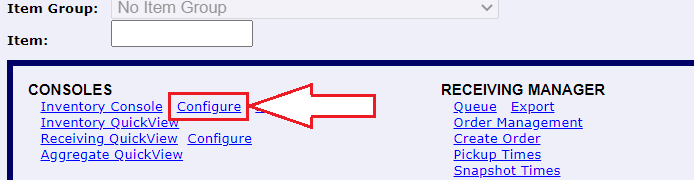
- Click on
ConfigurebesidesInventory Console:
- This will open a new window with the
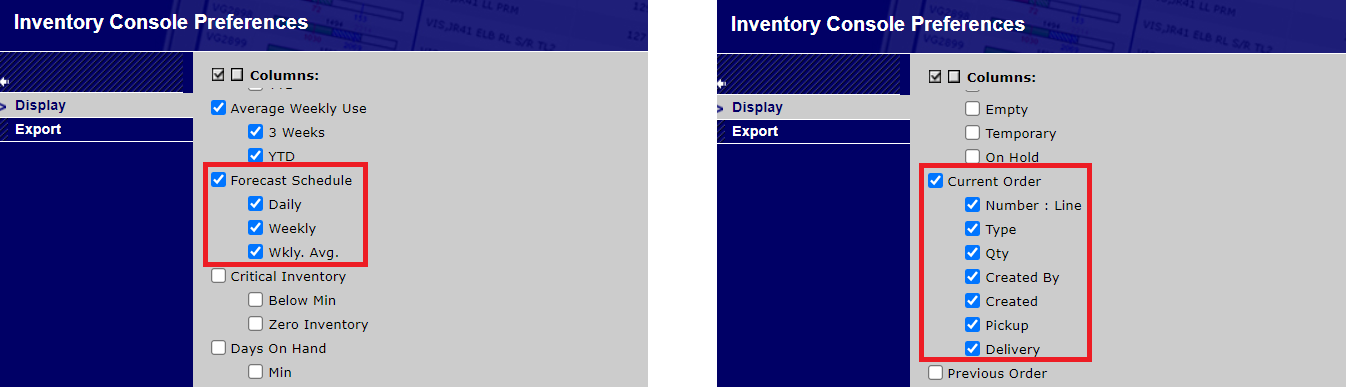
Columnssection. On scrolling over that section, the options forForecast ScheduleandCurrent Ordercan be found and these options (along with their sub-options) should be marked/unmarked as per what is required:
- Click
Applyto save the changes
Priyanka Bhotika
Comments
Yesika Delgado
I have reviewed the configuration, and I still continue with issues for see the forecast in weekly basis